

Preface: What is a self-hosted VPN?
While this term could apply to various types of setups – for this post we are referring to a “self-hosted VPN” in the context of someone hosting a VPN “server” within their home so they can travel abroad and still have it appear to external parties that their internet traffic is originating from their home IP address. This is often used by expats, digital nomads and other remote workers.
This is a VPN that you manage end-to-end, which is very different from using a commercial VPN service where traffic is going through a subscription service to a 3rd party VPN server and IP address.
A residential self-hosted VPN setup typically involves two essential components:
1. A VPN Server – using a VPN capable home router to replace your existing home ISP (Internet Service Provider) router, or using a smaller VPN appliance that you attach behind your existing home ISP router.
2. A VPN Client – using a VPN travel router or a phone/PC VPN software app that creates an encrypted tunnel and allows you to router the client device traffic back through your Server (and home IP).
There are various VPN protocols that can be used for the VPN tunnel encryption, but for simplicity, this post covers direct client > server setups using common protocols like WireGuard or OpenVPN. These same principles also apply to using technologies such as Tailscale or ZeroTier, but in those cases there can be additional factors involved, such as relay nodes.
VPN speed component #1: Internet bandwidth
When discussing “speed” (aka. “bandwidth” or “throughput”) we’re referring to the rate that you send or receive data, measured in Mbps (megabits per second). When you purchase a residential ISP package, they are usually quoted by the download speed and often make no mention to the upload speed. This is because with typical home use, you are primary downloading content (web pages, video streams, gaming streams, etc), and your upload bandwidth is only being used to send back small data acknowledgement packets or when sending something like an email or outbound chat message.
This dynamic changes considerably when using a self-hosted VPN setup. With a self-hosted VPN setup, all 3 of these speeds are equally important:
- The download speed of the home ISP connection
- The upload speed of the home ISP connection
- The download speed of the remote/travel location
Your total end-to-end VPN connection will be limited to the slowest of these 3 connection speeds, so your home ISP upload speed, which is often not thought about much, becomes just as important as your download speed.
Why? We’ll use this example:
Let’s say you have your VPN server located at a home in the US, with Xfinity as your home ISP provider that provides 500 Mbps download & 40 Mbps upload speed, and you are in Mexico watching your streaming US TV channels on your laptop via your VPN travel router that is connected to a hotel WiFi connection with a 100 Mbps download speed:
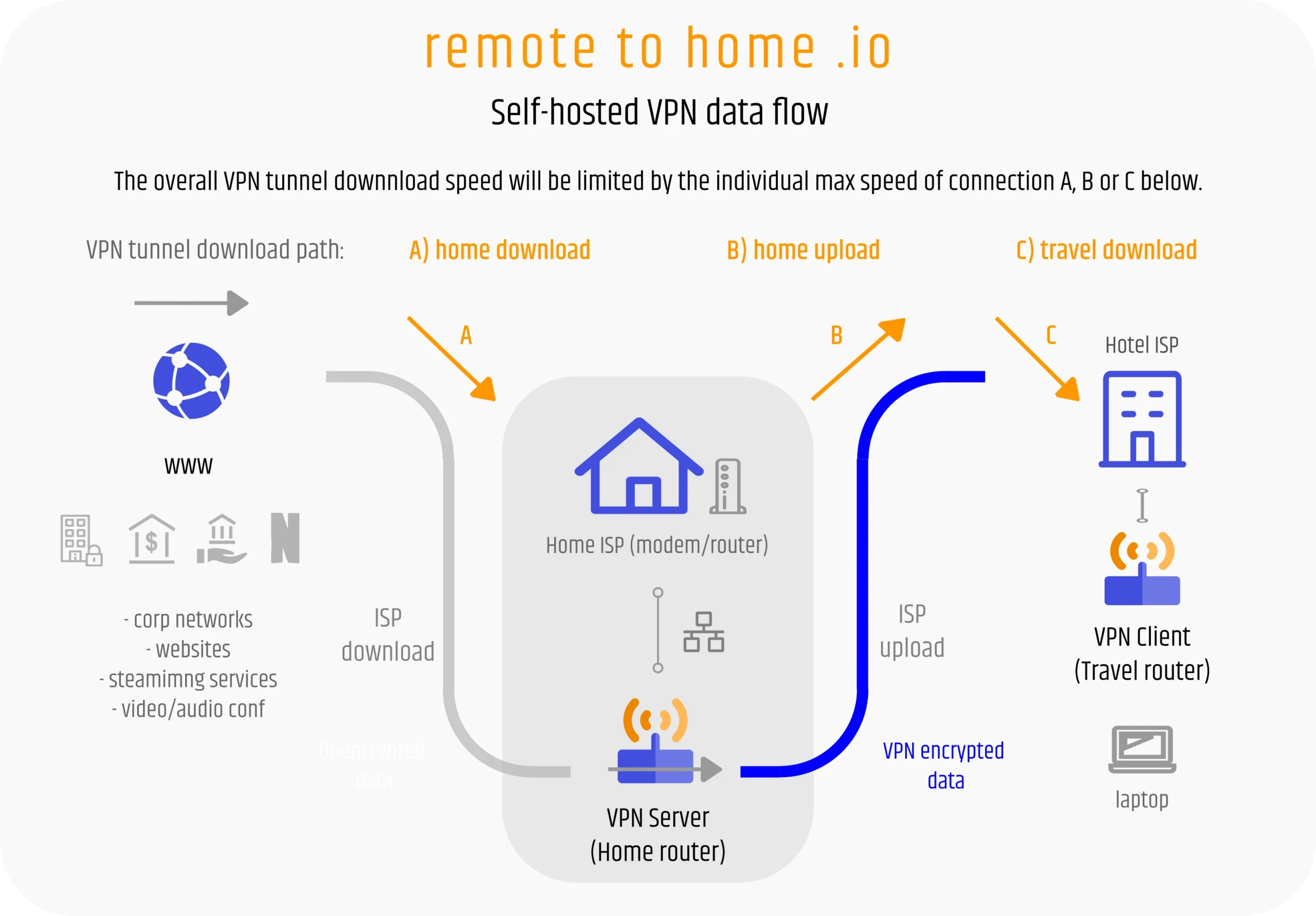
The data flow:
1. Your outbound request for data originates from your laptop (MX), through the encrypted VPN tunnel to your server (US), and initiates the download from the internet streaming service via your US Xfinity home IP.
2. The data packets from the streaming service travel in through the 500 Mbps download pipe of your US Xfinity connection into your home network and to the VPN server. (arrow A)
3. Your VPN server receives the incoming packets, encrypts them with the VPN protocol and then relays (“pushes”) them across the internet through the VPN tunnel using the 40 Mbps upload pipe of your US Xfinity connection. (arrow B)
4. Your remote VPN travel router (MX) then receives the encrypted packets from the VPN tunnel via the 100 Mbps download pipe of the Mexican hotel ISP you are connected to at your travel location, and then decrypts the packets and relays them to your laptop. (arrow C)
So, when you are downloading through this VPN setup, your data stream is flowing through all 3 of these A>B>C pipes concurrently. Even though the server and client ISPs have faster download speeds; the Xfinity upload speed of 40 Mbps is the slowest link in the chain, so this will be the maximum download speed of your entire end-to-end VPN tunnel.
More about residential ISP speeds.. and which are the best for hosting a VPN server?
As mentioned earlier, when ISPs advertise their residential internet package speeds, they are usually only referring to download speeds, and upload isn’t mentioned at all, or only in the fine print. Again, this is no problem for average home use, but if you are planning to use this ISP to host a VPN Server, then some types of providers are better than others. Providers that offer symmetrical service (equal download & upload speeds) are usually a better choice than those that offer asymmetrical (big download, smaller upload). These are the typical types of modern broadband ISP providers.
1. Fiber optic services: These usually provide the best option as fiber service is symmetrical by design, and offers the lowest latency (covered later). If you get a 300 Mbps download, you get 300 Mbps upload as well. US examples: AT&T Fiber, Verizon Fios, Google Fiber, Quantum, Ziply Fiber, city/municipal fiber.
2. Cable/CATV (coaxial) services: These providers typically offer extremely asymmetrical service. Many provide packages up to 1000-2000 Mbps download (1-2 Gbps), with only a 20-40 Mpbs upload. Most areas are running the DOCSIS 3.1 protocol with areas slowly upgrading to the newer DOCSIS 4.0 which typically increases the upload to 100+ Mbps. Theoretically these providers could offer symmetrical service, but it seems the market doesn’t demand it. US examples: Xfinity (Comcast), Cox Internet, Spectrum, Optimum, Astound.
3. Cellular 4G/5G home internet services: This is a relatively newer segment of providers that send you a cellular modem that you can hopefully set near a window with good signal to the cell towers to provide you with high speed home internet. While speeds can vary greatly based on cell coverage and are typically asymmetrical, it can still be a great option in cases when you need your own private internet service but aren’t allowed to run cables (e.g. newer apartment complexes with a mandated ISP for the building). US examples: AT&T Air, Verizon 5G Home, T-Mobile 5G Small Business.
4. Satellite internet: The newest breed of consumer internet utilizing low-earth orbit satellites and small receiver “dishes” that often provide service in even the most remote locations. Typically asymmetrical, but also varies greatly depending on area and equipment. Example: Starlink is the only currently relevant high-speed offering.
When it comes to choosing an internet service for your VPN server location, there are other critical factors to consider besides just speed – such as the ability to port forward (avoiding CGNAT), but we’ll save that for another post. Also note that some of the example providers above have crossover services – such a Spectrum, which is now growing into fiber & cellular 5G offerings in select markets, and T-Mo getting into fiber.
We should also note there can be significant differences between an ISP’s advertised speed (theoretical max speed) and your real-life results due to multiple factors – especially with wireless providers. Finding your real current home ISP speed is as simple as connecting as directly as possible to your primary router (best via ethernet cable, or at least with strong WiFi signal) and running a few repeated speed tests using a web browser from a site like Speedtest.net. Another good page about speed testing with OpenWRT can be found here.
VPN speed component #2: Hardware support
The next most significant consideration for self-hosted VPN speeds is hardware support for the VPN encryption being used. VPN encryption involves math – lots of math – for every packet being sent through the tunnel. All this math takes processing power, which can be a limiting factor when dealing with small, lower-power VPN routers.
For the following examples we’re going to remove the ISP speeds from consideration by supposing we have 1 Gpbs (1000 Mbps) connection speeds for each of 3 important connections: home download, home upload and travel download. This means we have the bandwidth capacity to pull 1 Gbps downloads speeds through the VPN tunnel!.. BUT, this also means that both our server router and travel router would have to be able to keep up with encrypting and decrypting the data at that speed on each end of the tunnel.
Most consumer routers are designed to be relatively inexpensive, and you want low power requirements in case you may need to run your travel router off a batter pack as well as to reduce heat in small form factor cases. Realistically, you don’t need more than ~20 Mbps max VPN throughput for individual work/browsing/streaming use, so designing routers for 1 Gbps VPN processing would be a waste of both money and electricity.
The other factor impacting the amount of math (processing) involved is the type of VPN protocol you are using. Of the 2 most common self-hosted protocols, WireGuard is a newer VPN encryption protocol that is more efficient, especially on low power hardware. OpenVPN is an older and heavier (more math) protocol, but has more versatility in some situations. Most VPN routers will support faster speeds with WireGuard than with OpenVPN, but this can also vary based on specialized co-processors and newer kernel module software support (like in the case of OpenVPN DCO).
As a baseline, we’re going to provide some speed examples here using some of the most popular GL.iNet VPN router models running the WireGuard VPN protocol. (We are a GL.iNet business partner, so…)
- GL.iNet Flint 2, popular as a full home router & VPN server combo, supports WireGuard encryption speeds up to 900 Mbps.
- GL.iNet Brume 2, popular as a minimal-footprint VPN server appliance, supports WireGuard encryption speeds up to 355 Mbps.
- GL.iNet Beryl AX VPN travel router supports WireGuard encryption speeds up to 300 Mbps.
- Gl.iNet Slate AX VPN travel router supports WireGuard encryption speeds up to 550 Mbps.
So, considering the 1 Gbps end-to-end bandwidth speeds we mentioned earlier, if you had the Flint 2 (900 Mbps max) as your home server router, you could serve full speed VPN tunnels to 3 concurrent Beryl AX travel routers (@ 300 Mbps each), or close to 2 Slate AX travel routers (@ 450 Mbps each).
If you had a Brume 2 (355 Mbps max) home server router, you could provide full speed to 1 Beryl AX, partial speed to one Slate AX, or 50 Mbps tunnel speeds to 6 separate VPN clients concurrently.
In short, no matter how fast your available “A>B>C” bandwidth is, your individual VPN tunnel cannot run faster than the hardware devices it’s processed through (your server or travel router).
VPN speed component #3: ISP throttling
ISP have many fancy names for throttling – “performance management”, “network optimization”, “quality of service” – but in the end it comes back to the same thing: intentionally slowing down some traffic types in order to keep other traffic moving normally. They would like to say it’s making your priority traffic “faster”, but it’s not. It’s just keeping your priority traffic at the normal speed you already pay for by sacrificing the speed of other traffic they hope you won’t notice as much.
In the USA and many European countries there are restrictions on what ISPs are allowed to do for this, but in others it’s only ruled by economics. As an example, in India, it’s very common for an ISP to oversell the amount of bandwidth capacity they actually have available by 300+% in order to maximize profits. They do this assuming that only a small portion of their users will be online at any given time, and most of them will not be using anywhere near the full capacity of the package they purchased. Everything works fine until peak hours kick in (the internet version of “rush hour”). Then at around 6pm everyone gets off work, comes home and turns on their favorite streaming service – and suddenly the network is over capacity and straining to keep up. In order to keep customers from complaining that their TV steams or web browsing are feeling slow, the ISP simply starts clamping down all other types of traffic – and suddenly your VPN tunnel that was working smooth all day is almost unusable at 2-3 Mbps.
Sometimes you might be able to get around throttling by switching VPN protocols (e.g. from Wireguard to OpenVPN), but for many of our customers living in these countries, they end up having to purchase ISP connections from several ISPs (hoping they won’t both throttle at the same time/amount), or purchasing more expensive “business class” connections for their home that are exempt from this type of throttling. There are also some countries that simply block certain VPN protocols, but again, that’s worth an entirely separate post.
From our personal experience and those of our global clients, here’s a high-level list to consider. Please note that experiences can vary based on different ISPs and ISP connection types within these countries (e.g. landline versus cellular):
Countries with total or some level of VPN protocol blocking: North Korea, China, Russia, Egypt, Iraq, Iran, Syria, Turkey, some Central Asian (-stan) countries, some other Middle East (Jordan, UAE, Qatar, esp. Zain ISP).
Countries where either constant or periodic (peak time) throttling is often reported: India (esp. Jio ISP), Pakistan, Vietnam, Malaysia, Indonesia.
Regions/countries that rarely report blocking or throttling: Americas (North/Central/South), Europe*, Africa (except Egypt), Oceania*, Japan, Thailand.
* UK and Australia are in flux right now regarding VPN blocking due to new censorship laws.
It’s also worth noting that in some countries with less developed infrastructure it can simply be hard to find solid internet connections with decent consistent bandwidth. This is entirely different than intentional throttling, but no less important.
Practicality – How much speed do you need?
While chasing 500 Mbps VPN tunnel download speeds is fun from a “nerd” perspective, it’s better to think about the right solution for your practical needs. A typical work PC performing general office work (browsing, email, video/audio conferencing, background work app processes, etc) isn’t using more than 10-12 Mbps on average. This could spike up if downloading a big file, but considering an MS Teams 1080HD group video call only consumes 2-4 Mbps, you don’t really need massive bandwidth.
As a general rule, we tell clients we would ideally like to see them have at least 25-30 Mbps download speed (and 5+ Mbps upload) on the travel end of their VPN tunnel. This provides some extra room to make up for short periods of network congestion, file downloads and to keep latency from spiking due to bandwidth constraints. That said, I’ve worked successfully through 8-10 Mbps VPN connections in remote travel countries while still being able to host acceptable video calls with 100+ participants. Many clients report that video/audio call don’t start to develop noticeable jitter and delay for them until under 10 Mbps.
So, considering our example above of a 40 Mbps max server upload speed, 1 person should be able to work comfortably connected to that server. If you had 2 people actively working (either via the same travel router VPN tunnel of via 2 separate VPN tunnels) things *should* be mostly okay, unless one of you starts pulling a lot of bandwidth (e.g. downloading a big file) while the other is trying to have a video call.
There is no “one size fits all” answer to this question as it depends on the type of work you do. If you are transferring large video files or doing massive git/subversion transfers regularly, then life will feel a bit painful at 30 Mbps, but hopefully this provides some baseline to start from.
Note that we are leaving out one major factor when it comes to things like call & audio quality over a VPN, which is latency, but that deserves a separate post of it’s own. Latency is the measure of how long it takes a data packet to get from point A to B, and it most significantly impacts the performance of real-time applications like video and audio calls (or remote desktop / Citrix clients). That said, most popular video/audio conferencing and VoIP calling applications include algorithms and buffers to help reduce these impacts. For now, just consider that in a VPN scenario, the largest impact to latency will be how physically far your VPN client is from your VPN server; and the further away you are going to be, the better it is to have a little more extra bandwidth (Mbps) to keep from compounding the issue.
Summary
1. Both download and upload speeds are important for the ISP connection of your VPN server. For your travel network, mostly only the download speed matters. For a single-user VPN setup, try to ensure you have a minimum 40 Mbps of raw down & upload internet speed on the sever end, and 30 Mbps download on the travel end.
2. When it comes to router hardware, devices like the GL.iNet Brume2 server appliance and Beryl AX or Slate AX travel router will provide plenty of speed for practical use. Slower devices like the Opal or Mango could suffice, but you may find them limiting for daily work. Devices like the Flint 2 or Flint 3 are often overkill unless you’re either planning to use them as primary home replacement router, or you have a 1+ Gbps home fiber optic connection and plan to have many VPN clients connecting to it concurrently.
3. Some countries and ISPs may throttle (or even block) VPN connections. You may have some workaround by switching VPN protocols, but in others you may have no choice but to change ISPs or avoid the country altogether. Starlink (satellite-based) internet is becoming a more popular alternative/backup option for our expat and digital nomad clients for reliable travel connectivity given the increasing country availability and recent compact travel units like the Starlink Mini.