
Why?
Let’s say you’re on the GL.iNet forums or emailing customer support trying to troubleshoot a bug in your router. You and the tester are both running the exact same firmware version, using the same settings, and “sorry, can’t reproduce“. Three rounds later, you start questioning your qualifications to even reliably use a keyboard.
Spoiler: You may not really be running the same firmware.
TL;DR – Check your actual version + type + build number for the full story. Jump here and run the command.
How did this happen? Same firmware label, different bytes
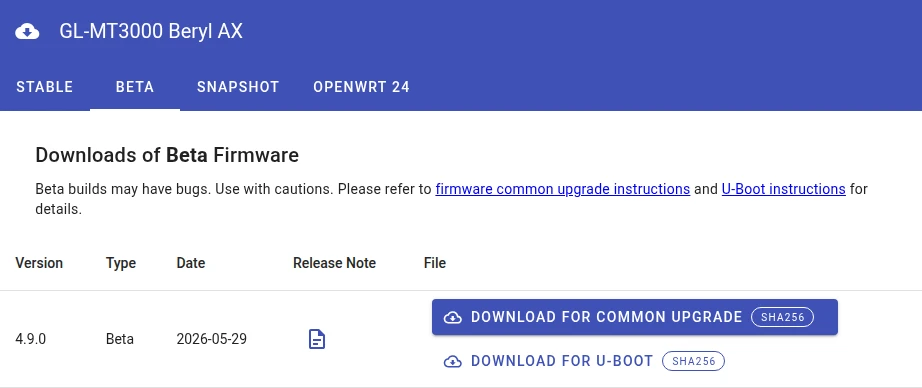
Most are probably not aware, but GL has a history of re-posting different firmware under the same version name/label in the download center. We’ll use the popular Beryl AX (GL-MT3000) Beta firmware as the most recent example.
What you see today (6/2/26) in GL.iNet firmware download center:
What you see when checking our GL.iNet community firmware mirror:
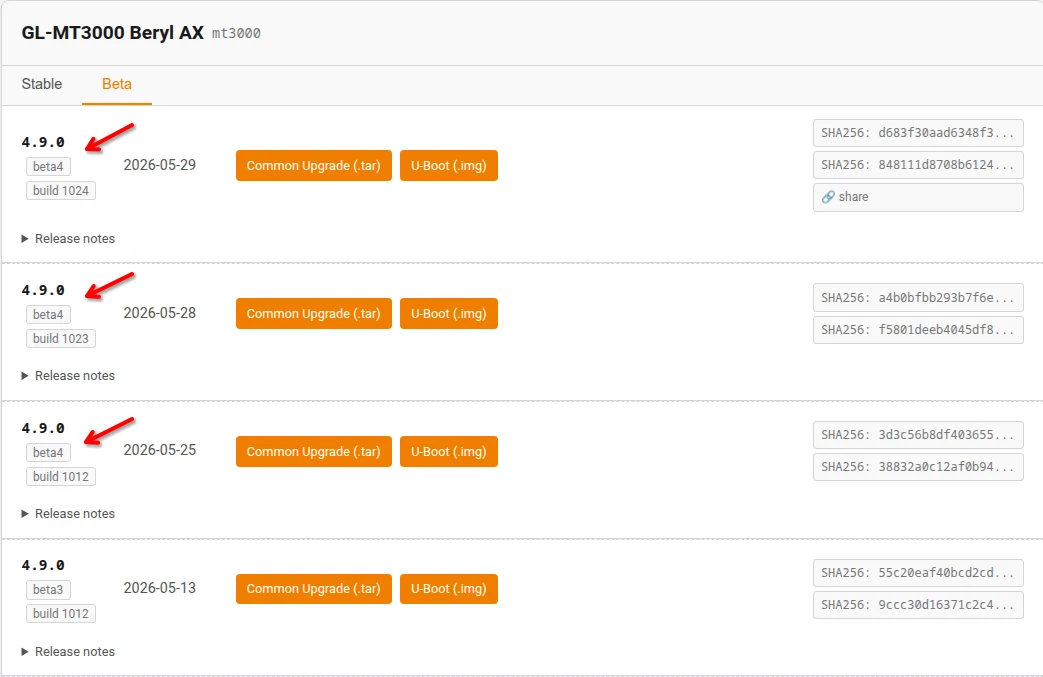
You installed v4.9.0-beta4 on May 27th, someone else installed the “same” v4.9.0-beta4 three days later, and you’re both now unknowingly running firmware that’s two actual versions apart.
These aren’t just packaging or key signing changes, they are actual different firmware build numbers.. Receipt:
| Build label | Build number | Compile date | .tar size | .img size | SHA256 prefix |
|---|---|---|---|---|---|
beta4 | 1012 | 2026-05-16 | 72,904,313 | 76,283,904 | 3d3c56b8… |
beta4 | 1023 | 2026-05-28 | 72,955,513 | 76,414,976 | a4b0bfbb… |
beta4 | 1024 | 2026-05-29 | 72,955,811 | 76,414,976 | d683f30a… |
We also extracted builds 1012 and 1024 to look inside, and the deltas at the filesystem layer are real:
- Kernel binary: 3,700,235 bytes (build 1012) vs 3,700,043 bytes (build 1024).
192 bytes different. It sounds trivial, but “192 bytes in kernel space” could be a bug fix, a single config flag, or a quick backport from upstream OpenWrt. It’s exactly the room needed for a difference between “bug” and “can’t reproduce”. - Root filesystem: 69,193,728 bytes (1012) vs 69,241,856 bytes (1024).
~47 KB different. This is certainly not trivial. It’s multiple files changed. This could be package updates, UI tweaks, daemon binaries or config defaults.
You don’t know because you don’t see it..
The frustrating part about this is there’s no way to tell from your router UI or from the download center itself. The GL.iNet GUI description stops with just the type (beta4 in this case), but doesn’t provide the build number, and neither does LuCI.
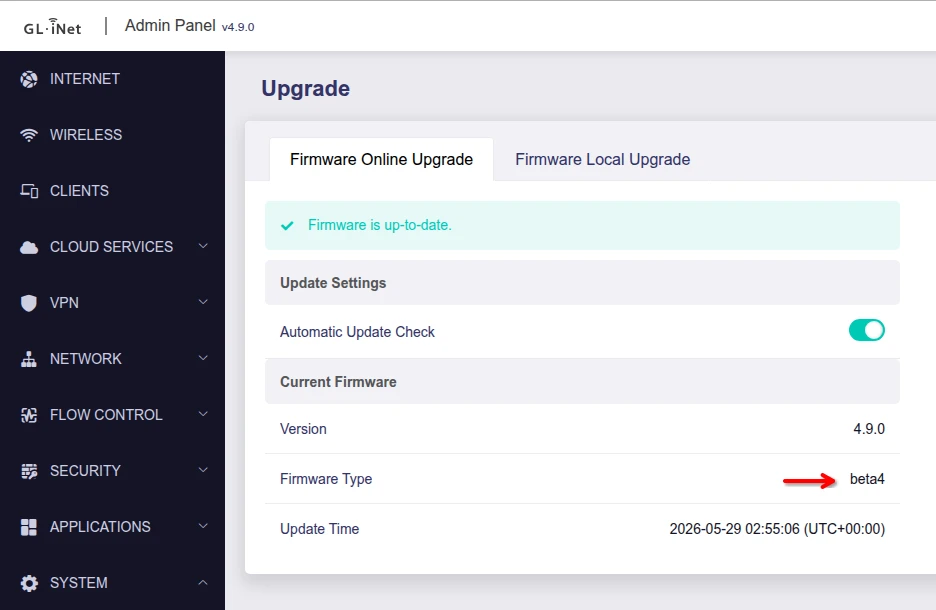
Even if the GUI did list it, the GL download center doesn’t provide any reference to the Type or Build number, so the only visual way you could tell the DL center has a newer version than yours is by remembering the date you installed your beta.
You don’t know *what* has changed either..
The further frustrating for troubleshooting is you don’t know what changed. For the 4.9.0-beta4, these are the only lines in the Release Notes that changed between the builds:
Build 1012
2026-05-16: Update the dnsmasq component to version 2.92, incorporating upstream CVE fixes.
Build 1023
2026-05-28: Update the dnsmasq component to version 2.92, incorporating upstream CVE fixes
Build 1024
2026-05-29: Update the dnsmasq component to version 2.92, incorporating upstream CVE fixesThis is a beta firmware, which has only undergone basic testing. Please use with caution and contact support@gl-inet.com if you encounter any problems.
It’s not exactly clear if this means that dnsmasq was updated to v2.92 three separate times in different ways, or if they just changed the date prefix for this line and the real changes are something else. That “something else” may be just the bug you’re chasing.
Not just for beta..
The same behavior as been happening in Stable. Another recent example picked up by the mirror with Flint2 (GL-MT6000) stable:
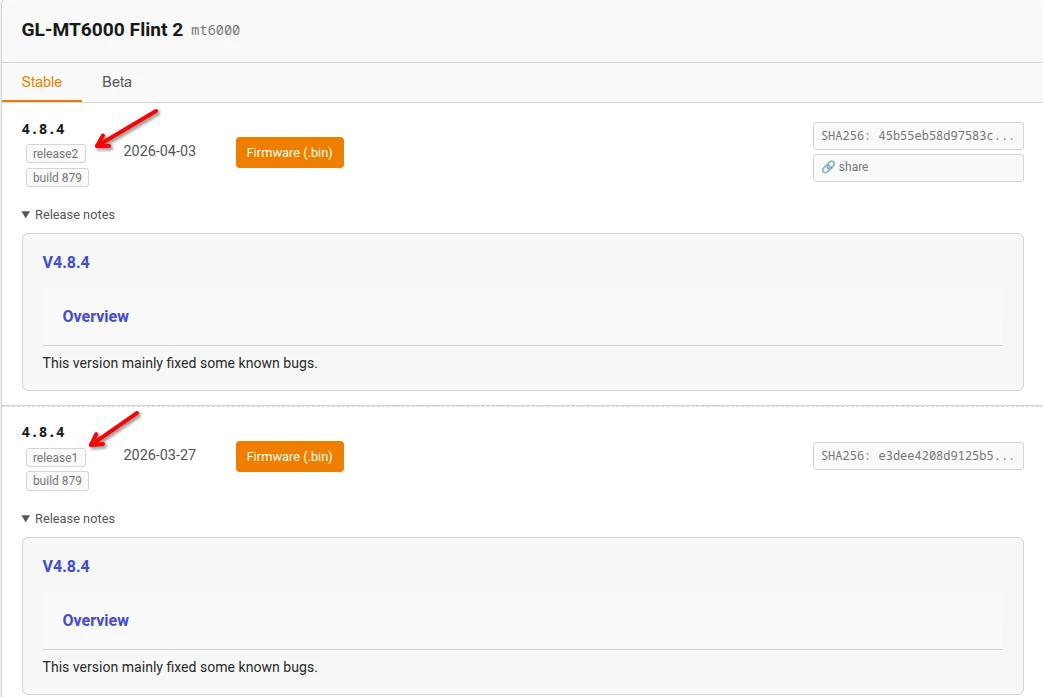
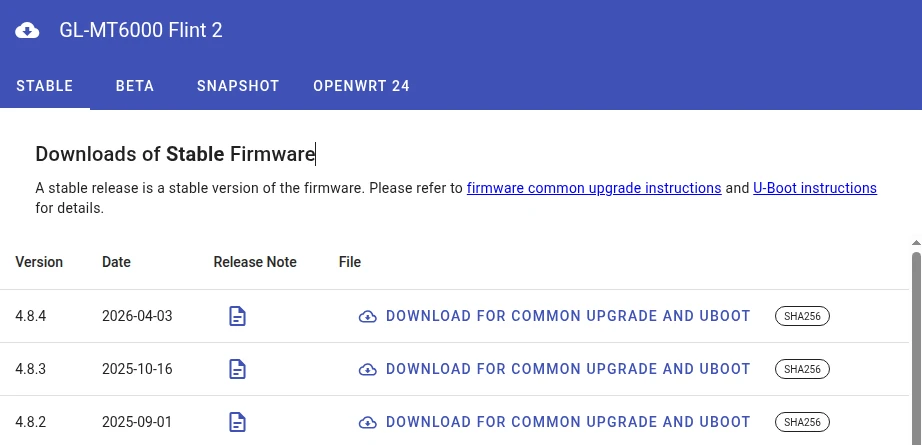
Two different firmware release files, but no indication in the DL center page that it ever happened, or why. This one is a little more subtle as even the build number is the same, so the only way to know something changed is a thing most wouldn’t even know to look for – when you actually download the file, you’ll see the “releaseX” difference in the image’s filename. Fortunately the mirror parses this out and displays it plainly in the web UI as a visual indicator.
Where this matters to you
Troubleshooting bugs:
- You see a crash they don’t – is this an error in your config or a fw change?
- Post/announcement says “fixed in beta4” – beta4 build 1012, or beta4 build 1024?
- Support is trying to reproduce your bug report – GL staff opens it, looks at their current
beta4 with the same config and can’t reproduce.
Security disclosure and patching:
- Using the dnsmasq CVE fix example from above – did build 1012 fully fix it and the other just date stamp swaps, or you need to be on build 1024 to be fully protected?
- Researcher posts a PoC exploit and you want to test it yourself.. which one?
Updating & automated deployments
- You just want to ensure you stay up to date on the latest firmware. You check your router’s update menu, see “4.9.0” and “beta4”. You check the download center and see “4.9.0 Beta”, so you’re good, right? : /
- You have version-based deployment/update automation.
We are both a business partner and big fans of GL.iNet. This post isn’t to throw shade, it’s intended to help the community and GL support teams get the most out of the products by building awareness of this nuance. Knowing *why* you may have a seemingly unique issue is the first step in getting it fixed. This also helps solve the old mystery of “re-installing with the same firmware fixed it, when a factory reset didn’t.“
We’ve reported this gap to GL and understand they’re in process of addressing it. In the meantime, now that you know what may be happening, it’s easily fixable – you just need to do a little digging.
Pulling the build identity directly from a router
The key detail you need about your firmware can be found in both the live router itself and in the downloadable firmware files – the version + type + build number. For a live router:
SSH into your router and login (instructions):
ssh root@192.168.8.1Once you’re logged in, paste this one-liner:
echo "GL: $(cat /etc/glversion) $(cat /etc/version.type) build $(cat /etc/version.build) ($(cat /etc/version.date)) on $(. /etc/openwrt_release; echo $DISTRIB_DESCRIPTION)"Produces a single line like this:
GL: 4.9.0 beta4 build 1024 (2026-05-29 10:55:06) on OpenWrt 21.02-SNAPSHOTOr, if you want to get fancy about it:
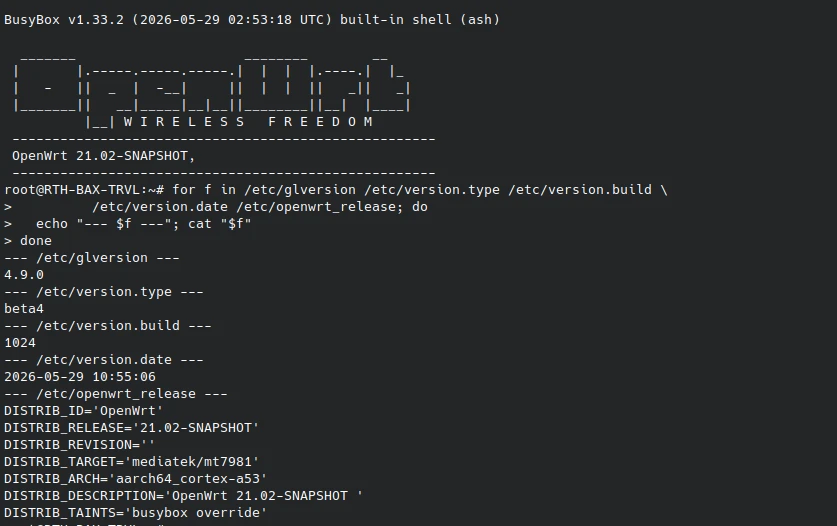
for f in /etc/glversion /etc/version.type /etc/version.build \
         /etc/version.date /etc/openwrt_release; do
  echo "--- $f ---"; cat "$f"
doneThe output looks like:
--- /etc/glversion ---
4.9.0
--- /etc/version.type ---
beta4
--- /etc/version.build ---
1024
--- /etc/version.date ---
2026-05-29 10:55:06
--- /etc/openwrt_release ---
DISTRIB_ID='OpenWrt'
DISTRIB_RELEASE='21.02-SNAPSHOT'
DISTRIB_REVISION=''
DISTRIB_TARGET='mediatek/mt7981'
DISTRIB_ARCH='aarch64_cortex-a53'
DISTRIB_DESCRIPTION='OpenWrt 21.02-SNAPSHOT '
DISTRIB_TAINTS='busybox override'
That’s it, the specific identity of the firmware running on your router. Everything you need to ensure that you’re testing against the same firmware.
Reading the build straight from the filename
GL.iNet’s firmware filenames are remarkably honest about what they contain (another GL plus over many vendors). The naming pattern looks like:
mt3000-4.9.0_beta4-1024-0529-1780026246.tarBreaking that down:
mt3000– model code4.9.0– product version (matches/etc/glversion)beta4– release channel (matches/etc/version.type)1024– build number (matches/etc/version.build)0529– abbreviated compile date (May 29)1780026246– Unix epoch timestamp of the compile
GL has provided everything you need – assuming you trust the filename.
Filename was changed? Don’t trust it? Extract it yourself.
Bonus for the curious..
If you don’t trust the filename, the build identity is also embedded inside the firmware. You can extract it without flashing the file to a router – now *you* are the security researcher.
Linux or Mac – you will need squashfs-tools (Windows will need WSL)
1. Copy/paste this, into a file name “gl-fw-id.sh” (or whatever you prefer):
#!/bin/sh
# gl-fw-id — print the GL.iNet build identity embedded in a firmware file.
# Usage: gl-fw-id <firmware-file.tar|.bin>
#
# Works on any GL.iNet router sysupgrade firmware (.tar and .bin are both
# POSIX tar archives despite the extension). Needs: tar, find, unsquashfs.
set -eu

FW="${1:-}"
if [ -z "$FW" ]; then
    echo "Usage: $0 <firmware-file.tar|.bin>" >&2
    exit 2
fi
if [ ! -f "$FW" ]; then
    echo "Error: file not found: $FW" >&2
    exit 1
fi
if ! command -v unsquashfs >/dev/null 2>&1; then
    echo "Error: unsquashfs not found. Install squashfs-tools:" >&2
    echo "  Debian/Ubuntu: sudo apt install squashfs-tools" >&2
    echo "  Fedora:        sudo dnf install squashfs-tools" >&2
    echo "  Arch:          sudo pacman -S squashfs-tools" >&2
    echo "  macOS:         brew install squashfs" >&2
    exit 1
fi

WORK=$(mktemp -d)
trap 'rm -rf "$WORK"' EXIT

if ! tar xf "$FW" -C "$WORK" 2>/dev/null; then
    echo "Error: not a readable tar archive (expected a GL.iNet .tar/.bin sysupgrade): $FW" >&2
    exit 1
fi

ROOT=$(find "$WORK" -maxdepth 2 -name root -type f | head -n1)
if [ -z "$ROOT" ]; then
    echo "Error: no squashfs 'root' member found — not a GL.iNet router sysupgrade file." >&2
    echo "(KVM-over-IP, IoT, and E5800 .zip firmware use different formats.)" >&2
    exit 1
fi

unsquashfs -d "$WORK/rootfs" -q -no-progress "$ROOT" \
    etc/glversion etc/version.type etc/version.build \
    etc/version.date etc/openwrt_release >/dev/null 2>&1 || true

for f in glversion version.type version.build version.date openwrt_release; do
    if [ -f "$WORK/rootfs/etc/$f" ]; then
        echo "--- /etc/$f ---"
        cat "$WORK/rootfs/etc/$f"
    fi
done2. Make it executable:
chmod +x ./gl-fw-id.sh3. Now you can run it against any recent GL router firmware “.tar” or “.bin” file and see the same fancy output as above.
./gl-fw-id.sh ./mt3000-4.9.0_beta4-1024-0529-1780026246.tar4. Place it in your user PATH (e.g. ~/bin) if you want to be able to run it from any directory in the future.
Now you can verify the version, type and build of the file you have versus the live router.
Important note – checksums matter!
When it comes to working with firmware files, checksums are critical to ensuring the integrity of what you have on disk versus the trusted source. If you’re not familiar, a checksum (aka. hash) is a unique string of letters and numbers that acts as a digital fingerprint for a file. It’s generated by running the file contents through a standard mathematical algorithm (like SHA-256 or MD5). Even the smallest change to the file’s contents will cause it to generate a different checksum.
In the case of GL’s download center, they provide the trusted a SHA-256 checksum for each posted firmware file.
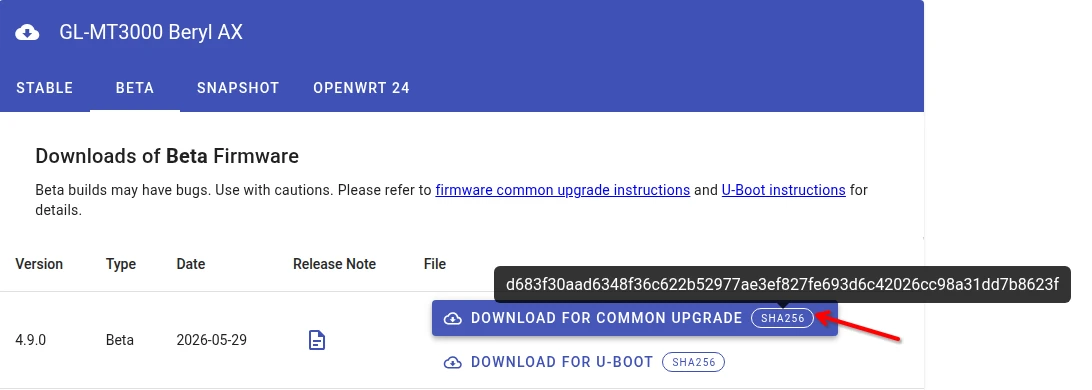
After you download a file, you should use your OS tools to generate a SHA-256 checksum. It should match what you see from their site (even if you changed the filename). If not, then you’re not working with the same file they say you’re supposed to have. It could be from a corrupted download, a hack or a download mistake. Regardless, if it does not match, do *not* install that firmware file to your router. Try the download again, and if they still don’t match then something is wrong. You can cross-check with our community mirror to investigate (we record all checksum changes at each sync run), or contact GL support.
Why a community firmware mirror?
The original reason was that we had many cases where a customer needed to restore to an older version of firmware they were previously running and it was no longer available for download. For example, if you were running an old 4.5.x version that was stable for your needs, and then upgrade to a newer version and find it doesn’t work for you, then you should have the ability to revert (or even to any prior beta version). This is especially true if you have a firmware settings backup file that you want to restore, but it must (typically) be restored to the same fw version it was originally taken on. In either of these cases, if the firmware has been removed from the GL download center, then you were stuck (or emailing support) prior to the mirror.
RTH GL.iNet Community Firmware Mirror benefits overview:
- Maintains a full history of all Stable, Beta and Legacy firmware since Jan 2023 (fully mirrored firmware image files, not just links back to the GL server files).
- GL’s download center maintains a limited amount of history for Stable firmware versions
- GL’s download center only maintains the single most recent Beta firmware version
- Provides version history even in the case of GL “silent swaps” of posted fw images (including the release notes history).
- Displays the firmware version number, build type/channel and build number for each image (for the newer fw where the data is available). You can cross reference the dates or checksums with the GL DL center to know which is currently posted there.
- Provides redundancy in the case of a GL download center outage.
- Provides a public firmware checksum integrity cross-reference – making it obvious if GL’s DL site was ever compromised by an external hack or insider threat.
- Mirror page and files are served via pure Cloudflare R2 storage and global edge CDN – ensuring availability where GL’s site may be blocked or download filtered (and faster download speeds)
- Allows direct linking / sharing to specific firmware versions.
- (Coming soon – allows email subscription for notification of new firmware version release per model.)
Summary
- Use the tools above to ensure you’re comparing apples-to-apples when troubleshooting router issues.
- Include the fw version, type & build number when posting potential firmware issues on forums or to support, so others can accurately test/reproduce.
- Use the methods above to pull the build number from your router and check with the community firmware mirror to check if the “betaX” version you’re running is actually the latest version published.